O ciclo de produção de um app na era da IAThe app production cycle in the AI era
Uma conversa, fase a fase: como cada etapa era feita antes, o que a IA mudou, e quais ferramentas fazem isso hoje.A conversation, phase by phase: how each stage was done before, what AI changed, and which tools do it today.
Senta aqui, que essa conversa vale a pena. Todo texto sobre “IA no design” promete revolução e entrega fumaça: fala em “ferramentas de IA” sem dizer quais, o que fazem ou como se usam. Vamos pelo caminho contrário — devagar, por fase, do jeito que se aprende de verdade. Em cada etapa você vai encontrar sempre a mesma tríade: como era feito antes, o que a IA mudou e quais ferramentas fazem isso hoje.
Se você guardar só uma lição deste texto, guarde esta: a IA assumiu a produção — gerar, montar, traduzir, preencher — e te devolveu o que sempre importou, o julgamento. Dominar as ferramentas não te torna substituível; te torna quem conduz o processo. Vamos por partes.
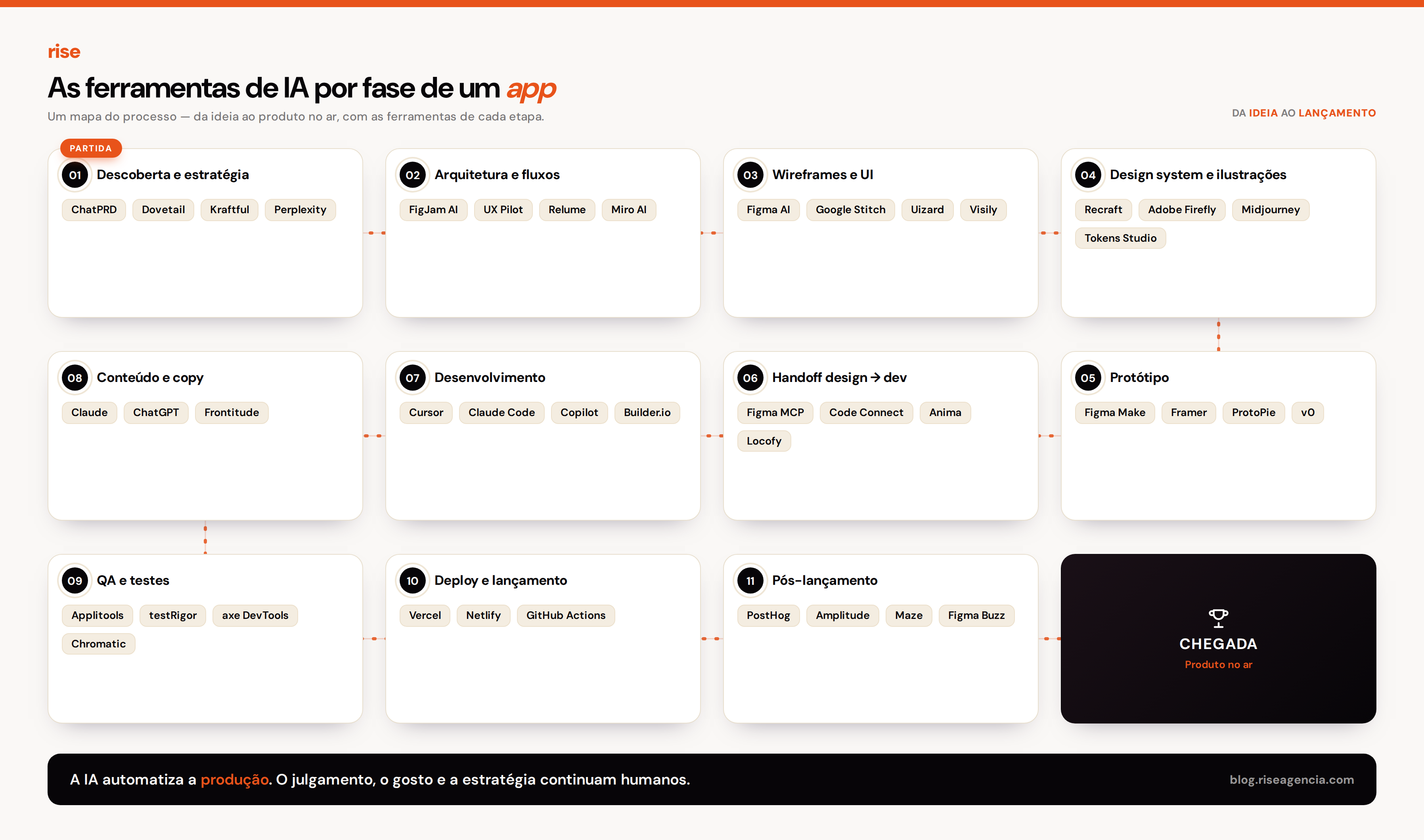
1. Descoberta e estratégia
Antes: a gente passava semanas em reuniões e lia dezenas de transcrições de entrevista, uma a uma. O PRD nascia de uma folha em branco, e o estudo de concorrentes virava um slide que já envelhecia no dia seguinte.
Agora: a IA transcreve, agrupa os temas e rascunha o documento em horas — e, o mais importante, mantém cada descoberta ligada à fala real do usuário, pra você poder conferir a origem.
Ferramentas: deixa eu te apresentar. O Dovetail e o Kraftful sintetizam entrevistas e amarram cada insight à frase original (o Kraftful ainda entrevista usuários sozinho, pra fechar as lacunas). Pra virar documento, o ChatPRD (treinado em milhares de PRDs) gera histórias, métricas e casos de borda — mas repare: um bom prompt no Claude ou no ChatGPT costuma bater a ferramenta especializada. Pra mercado, Perplexity (com fontes) e Crayon (de olho nos concorrentes).
E aqui vem a parte que a máquina não faz por você: decidir qual problema vale a pena resolver. Isso continua sendo seu.
2. Arquitetura de informação e fluxos
Antes: fluxograma no quadro branco ou no Whimsical, redesenhado inteiro toda vez que o escopo mudava.
Agora: você descreve o produto e recebe o mapa de telas pronto pra refinar — antes de desenhar qualquer pixel.
Ferramentas: FigJam AI e Miro AI montam e organizam os fluxos; o UX Pilot (Autoflow) devolve o mapa completo a partir da sua descrição; e, se o projeto é um site de marketing, o Relume entrega o sitemap e a estrutura já com os componentes.
3. Wireframes e interface
Antes: cada tela desenhada do zero no Figma, componente por componente. Foi por muito tempo a etapa mais cara em horas — e a mais cansativa.
Agora: a tela nasce de um prompt, de um screenshot ou de um rascunho, em segundos. Preste atenção nesta lição, porque é onde mais gente se confunde: existem duas famílias de ferramenta aqui.
Ferramentas — mockup editável: Figma AI (First Draft) dentro do Figma; Google Stitch (o antigo Galileo, grátis, com canvas infinito e consistência entre telas), ótimo pra pitch; Uizard e Visily, que transformam texto, screenshot ou rascunho em wireframe editável (o Visily chega a desmontar o print de um concorrente em componentes). Ferramentas — código direto: o v0 (Vercel) já entrega React/Tailwind com acessibilidade correta; Lovable e Bolt geram o app inteiro. Guarde a diferença: uma família te dá desenho, a outra te dá código.
E o segredo que separa o amador do sênior? Em 2026 quase todas geram um primeiro rascunho decente — isso deixou de ser o mérito. O mérito está no depois: iterar e manter o design system coerente entre dezenas de telas. (Um aviso amigo: o First Draft ainda não gera usando o seu design system.)
4. Design system e ilustrações
Antes: semanas montando tokens e componentes na mão, e ilustrando ícone por ícone no Illustrator — sempre com o risco de cada peça sair num tom levemente diferente.
Agora: a ferramenta aprende a linguagem da sua marca com poucas referências e produz tudo consistente, em escala.
Ferramentas: guarde bem este nome — Recraft. É o único que gera SVG nativo e aprende o estilo da sua marca a partir de poucas imagens, o que mantém centenas de assets falando a mesma língua. O Adobe Firefly mora dentro do Illustrator/Photoshop (Text-to-Vector, seguro pra uso comercial) e o Midjourney entrega arte mais pictórica. No sistema em si, o Figma AI tem o revisor “Check Designs”, o Tokens Studio cuida dos tokens, e o Figma Agent expande tudo em componentes usando os seus tokens reais.
Agora, a parte que é só sua: o gosto e a direção de arte. É exatamente isso que tira o “cara de IA” de um projeto — e nenhuma ferramenta faz por você.
5. Protótipo
Antes: telas ligadas uma a uma na mão, com interação limitada ao clique básico.
Agora: a interface vira um protótipo navegável e as interações são deduzidas sozinhas.
Ferramentas: Figma Make (leva do design ao protótipo e ao React, com o sistema embutido), Framer (design mais código hospedado) e ProtoPie (pras interações e microanimações mais delicadas). Um conselho: o código que sai de um protótipo de IA vem “solto” — use como referência, nunca como produção.
6. Handoff de design para desenvolvimento
Antes: redlines, specs e tickets descrevendo cada padding fora do lugar. O dev abria o arquivo, apertava os olhos no inspetor e recriava tudo na mão — uma tradução manual, lenta e infinita.
Agora: o design virou dado estruturado que o agente lê direto. E olha que bonito: o handoff de mão única deu lugar a um vai-e-volta entre design e código.
Ferramentas: o Figma Dev Mode MCP server (mcp.figma.com/mcp) entrega layout, tokens e variáveis pros agentes — Claude Code, Cursor, GitHub Copilot, Windsurf — com 85–95% de acerto quando o arquivo é bem-feito. O Code Connect liga o componente do Figma ao React de verdade, e o code-to-canvas captura a tela rodando e devolve como camadas editáveis no Figma. Os plugins de sempre ainda ajudam: Locofy (o React mais limpo), Builder.io Visual Copilot (mapeia seus componentes) e Anima (melhor pra QA que pra produção).
Dois cuidados de professor: nenhum entrega 100% pronto — trate como ponto de partida. E o token do Figma MCP dá acesso a todos os seus arquivos, então guarde ele numa variável de ambiente, nunca no histórico do terminal.
7. Desenvolvimento
Antes: o dev traduzia o mockup em código linha a linha, com semanas de configuração antes da primeira tela funcionar.
Agora: agentes escrevem, revisam e integram; e conversores transformam o design em componentes de produção.
Ferramentas: Cursor, Claude Code, GitHub Copilot e Windsurf codam a partir dos seus tokens (via Figma MCP). Do Figma pra produção, o Builder.io Visual Copilot mapeia seus componentes (leva uns 75% do caminho) e o v0 entrega componentes React/Tailwind. Pra full-stack, Lovable (deploy sobre Supabase) e Bolt.
Não se engane com a mágica: o agente acelera, mas não elimina a engenharia. Responsividade, animação e casos de borda ainda pedem a sua mão.
8. Conteúdo e copy
Antes: cada campo preenchido na unha, com lorem ipsum arrastando-se até o fim do projeto.
Agora: as telas já nascem com texto realista e microcopy no tom da marca, em segundos.
Ferramentas: Claude e ChatGPT pro microcopy; Frontitude e Writer pra manter a voz coerente; e o recurso de substituir conteúdo do Figma, que popula as telas com texto de verdade.
9. QA e testes
Antes: teste manual, tela a tela, e acessibilidade conferida no olho — lento e cheio de pontos cegos.
Agora: a IA gera os casos de teste, sabe distinguir uma regressão de verdade de um ruído de renderização, e varre a acessibilidade dentro do CI.
Ferramentas: o Applitools (a “Visual AI” entende o que o usuário percebe e ignora o ruído; e o plugin dele no Figma compara a tela pronta com o design), o Chromatic (pra componentes no Storybook), o testRigor (testes em linguagem natural, com Mabl e QA Wolf na mesma família) e o axe DevTools / Deque (pra WCAG 2.2).
Um lembrete importante: revisão humana nos casos de borda é obrigatória — e regressão visual não substitui teste de acessibilidade. São coisas diferentes.
10. Deploy e lançamento
Antes: configurar build, ambiente e domínio na mão, a cada publicação.
Agora: deploy contínuo direto do repositório, publicado a cada mudança aprovada.
Ferramentas: Vercel e Netlify pra publicar; GitHub Actions pro CI. Simples assim.
11. Pós-lançamento
Antes: relatório montado à mão e cada peça de campanha criada do zero.
Agora: os dados te mostram o que iterar primeiro, e a IA gera as variações de marketing no tom da marca, em lote.
Ferramentas: PostHog, Amplitude e Mixpanel (comportamento e adoção), Hotjar (heatmaps), Maze e Sprig (pesquisa contínua) e o Figma Buzz (peças de marketing on-brand).
E, mais uma vez, a divisão de sempre: os dados apontam o quê; a decisão do porquê é sua.
Pra terminar — a lição que fica
Repare no fio que costura as onze fases: em todas elas a IA ficou com a produção — a parte antes manual, lenta e cara — e te devolveu o julgamento. Ela não escolhe qual problema resolver, não define a hierarquia da informação e não percebe quando algo tecnicamente correto atrapalha na prática. E um segredinho que quase ninguém conta: a IA nem sempre é mais rápida — em tarefa simples, escrever o prompt, revisar e corrigir dá mais trabalho que fazer do zero.
Quem passava o dia na produção vai sentir a pressão. Quem aprende a ser o maestro de um conjunto de ferramentas — sabendo o que cada uma faz, quando chamar e quando dispensar — se multiplica. Essa é a direção. O resto é ferramenta. Agora vai lá e experimenta uma delas hoje mesmo.
Pull up a chair — this one's worth it. Every “AI in design” article promises a revolution and delivers smoke: it says “AI tools” without naming which, what they do, or how to use them. We'll go the other way — slowly, phase by phase, the way you actually learn. At each stage you'll find the same trio: how it was done before, what AI changed, and which tools do it today.
If you keep just one lesson from this: AI took over production — generating, assembling, translating, filling in — and handed back what always mattered, your judgment. Mastering the tools doesn't make you replaceable; it makes you the one leading the process. Let's take it in parts.
1. Discovery and strategy
Before: we spent weeks in meetings and read dozens of interview transcripts one by one. The PRD started from a blank page, and the competitor study became a slide that aged the very next day.
Now: AI transcribes, clusters the themes, and drafts the document in hours — and, most importantly, keeps every finding linked to the user's real words so you can check the source.
Tools: let me introduce them. Dovetail and Kraftful synthesize interviews and tie each insight to the original quote (Kraftful even interviews users on its own to close the gaps). To make the document, ChatPRD (trained on thousands of PRDs) generates stories, metrics, and edge cases — but note: a good prompt in Claude or ChatGPT often beats the specialist tool. For market work, Perplexity (with sources) and Crayon (watching competitors).
And here's the part the machine won't do for you: deciding which problem is worth solving. That stays yours.
2. Information architecture and flows
Before: a flowchart on a whiteboard or in Whimsical, redrawn whole every time scope changed.
Now: you describe the product and get the screen map ready to refine — before drawing a single pixel.
Tools: FigJam AI and Miro AI build and organize the flows; UX Pilot (Autoflow) returns the full map from your description; and for a marketing site, Relume delivers the sitemap and structure with components already in place.
3. Wireframes and interface
Before: each screen drawn from scratch in Figma, component by component. For a long time this was the most expensive stage in hours — and the most tiring.
Now: the screen is born from a prompt, a screenshot, or a sketch, in seconds. Pay attention to this lesson, because it's where most people get confused: there are two families of tool here.
Tools — editable mockup: Figma AI (First Draft) inside Figma; Google Stitch (formerly Galileo, free, infinite canvas, cross-screen consistency), great for pitches; Uizard and Visily, which turn text, a screenshot, or a sketch into an editable wireframe (Visily can even break a competitor's screenshot into components). Tools — direct code: v0 (Vercel) hands you React/Tailwind with correct accessibility; Lovable and Bolt generate the whole app. Keep the distinction: one family gives you a drawing, the other gives you code.
And the secret that separates junior from senior? In 2026 almost all of them produce a decent first draft — that stopped being the merit. The merit is after: iterating and keeping the design system coherent across dozens of screens. (A friendly warning: First Draft still does not generate using your design system.)
4. Design system and illustration
Before: weeks building tokens and components by hand, and illustrating icon by icon in Illustrator — always risking each piece coming out in a slightly different tone.
Now: the tool learns your brand's language from a few references and produces everything consistently, at scale.
Tools: remember this name — Recraft. It's the only one that generates native SVG and learns your brand style from a few images, keeping hundreds of assets speaking the same language. Adobe Firefly lives inside Illustrator/Photoshop (Text-to-Vector, commercially safe) and Midjourney delivers more pictorial art. In the system itself, Figma AI has the “Check Designs” linter, Tokens Studio handles tokens, and the Figma Agent expands everything into components using your real tokens.
Now, the part that's only yours: taste and art direction. That's exactly what removes the “made by AI” look — and no tool does it for you.
5. Prototype
Before: screens linked one by one by hand, with interaction limited to a basic click.
Now: the interface becomes a navigable prototype and interactions are inferred on their own.
Tools: Figma Make (takes you from design to prototype and React, with the system baked in), Framer (design plus hosted code), and ProtoPie (for the more delicate interactions and micro-animations). A word of advice: the code from an AI prototype comes out “loose” — use it as reference, never as production.
6. Design-to-dev handoff
Before: redlines, specs, and tickets describing every misplaced padding. The dev opened the file, squinted at the inspector, and rebuilt everything by hand — a manual, slow, endless translation.
Now: the design became structured data the agent reads directly. And here's the beautiful part: one-way handoff gave way to a back-and-forth between design and code.
Tools: the Figma Dev Mode MCP server (mcp.figma.com/mcp) hands layout, tokens, and variables to the agents — Claude Code, Cursor, GitHub Copilot, Windsurf — with 85–95% accuracy on a well-built file. Code Connect links the Figma component to the real React one, and code-to-canvas captures the running screen back into Figma as editable layers. The usual plugins still help: Locofy (cleanest React), Builder.io Visual Copilot (maps your components), and Anima (better for QA than production).
Two teacherly cautions: none deliver 100% ready — treat it as a starting point. And the Figma MCP token grants access to all your files, so keep it in an environment variable, never in shell history.
7. Development
Before: the dev translated the mockup into code line by line, with weeks of setup before the first screen worked.
Now: agents write, review, and integrate; and converters turn the design into production components.
Tools: Cursor, Claude Code, GitHub Copilot, and Windsurf build from your tokens (via Figma MCP). From Figma to production, Builder.io Visual Copilot maps your components (about 75% of the way) and v0 delivers React/Tailwind components. For full-stack, Lovable (deploys on Supabase) and Bolt.
Don't be fooled by the magic: the agent accelerates, but it doesn't eliminate engineering. Responsiveness, animation, and edge cases still ask for your hand.
8. Content and copy
Before: each field filled by hand, with lorem ipsum dragging on to the end of the project.
Now: screens are born with realistic text and on-brand microcopy in seconds.
Tools: Claude and ChatGPT for microcopy; Frontitude and Writer to keep the voice consistent; and Figma's replace-content feature, which populates screens with real text.
9. QA and testing
Before: manual testing, screen by screen, and accessibility checked by eye — slow and full of blind spots.
Now: AI generates the test cases, tells a real regression from rendering noise, and scans accessibility inside CI.
Tools: Applitools (its “Visual AI” understands what the user perceives and ignores the noise; its Figma plugin compares the finished screen against the design), Chromatic (for Storybook components), testRigor (plain-language tests, with Mabl and QA Wolf in the same family), and axe DevTools / Deque (for WCAG 2.2).
An important reminder: human review of edge cases is mandatory — and visual regression does not replace accessibility testing. They're different things.
10. Deploy and launch
Before: configuring build, environment, and domain by hand on every publish.
Now: continuous deploy straight from the repo, shipped on every approved change.
Tools: Vercel and Netlify to publish; GitHub Actions for CI. Just like that.
11. Post-launch
Before: a report built by hand and each campaign asset created from scratch.
Now: the data shows you what to iterate first, and AI generates on-brand marketing variations in batches.
Tools: PostHog, Amplitude, and Mixpanel (behavior and adoption), Hotjar (heatmaps), Maze and Sprig (continuous research), and Figma Buzz (on-brand marketing assets).
And once more, the same old division: the data points to what; the decision on why is yours.
To close — the lesson that stays
Notice the thread stitching the eleven phases: in all of them AI kept the production — the once manual, slow, expensive part — and handed back your judgment. It doesn't choose which problem to solve, define information hierarchy, or notice when something technically correct gets in the way in practice. And a little secret almost nobody tells: AI isn't always faster — for a simple task, writing the prompt, reviewing, and fixing is more work than doing it from scratch.
Those who spent the day on production will feel the squeeze. Those who learn to be the conductor of a set of tools — knowing what each does, when to call it and when to pass — multiply. That's the direction. The rest is tooling. Now go on and try one of them today.